Newsletter
Join the Community
Subscribe to our newsletter for the latest news and updates
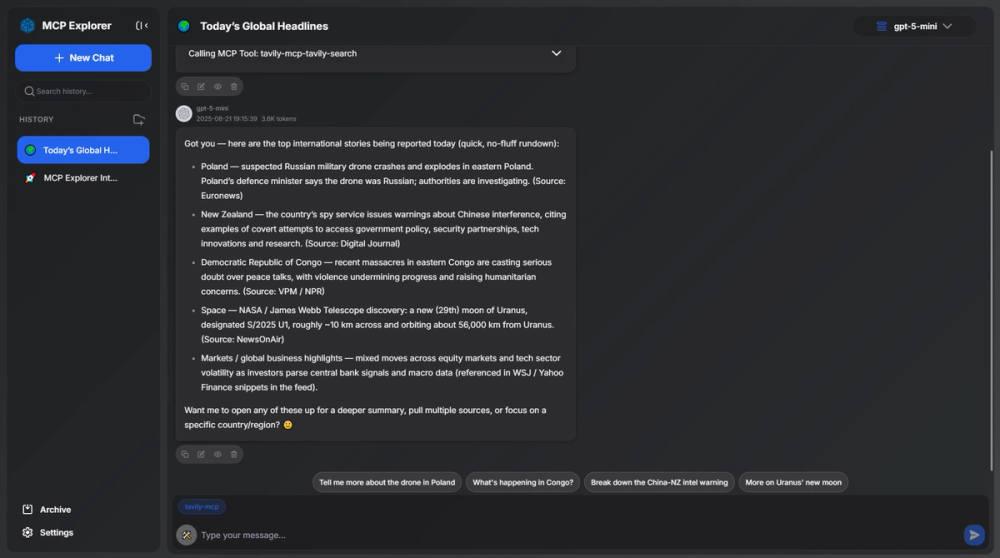
MCP Explorer Playground is a web-based MCP Client that can quickly access remote MCP servers based on SSE and Streamable HTTP types, and supports one-click import, configuration and connection to MCP tools. Convenient and fast, ready to use and go.
 Visit Website
🚀Welcome to use MCP Explorer Playground!🎉
I am your intelligent assistant, I can call tools provided by MCP servers to help you complete tasks such as data analysis, information queries, or problem-solving.
MCP Explorer Playground is a web-based MCP Client that can quickly access remote MCP servers based on SSE and Streamable HTTP types, and supports one-click import, configuration and connection to MCP tools. Convenient and fast, ready to use and go.
Please directly tell me your needs, if there are corresponding MCP tools, I will call the appropriate tools and provide clear, structured results!
What do you need me to help you with? 😊
Thank you for providing the detailed MCP server configuration steps! I have understood the process and organized it into a clear operation guide for you, while noting key precautions👇
✅ MCP Server Configuration Process
Prerequisites
Ensure you have registered for an MCP official account If not registered, you can directly add other third-party remote MCP servers for use.
🔧Operation Steps
1.Visit https://mcpso.cc and log in 🔐 Log in directly with Google or Github. 2.After logging in, click Upper right corner account avatar → 'My API Keys' 💡 If there is no key, you need to click 'Create API Key' first to generate. 3.On the key management page → Click key content → Copy complete key ⚠️ Please keep your key safe and do not disclose it! 4.Return to this Playground page → Click 'Settings' icon in the lower right corner 🌐 This refers to the settings panel of this tool. (not the official website page) 5.On the settings page → Find 'MCP Server' → Click 'Edit' 🖊️ Need to ensure that available MCP servers have been added. 6.Paste the key in the 'Request Header' input box → Click 'Save' 📌 Format example: Authorization: Bearer YOUR_API_KEY. 7.Click the 'Edit' button again → Tool list ✅ After success, the available MCP tool list will be displayed.
⚠️ Common Troubleshooting
Key invalid after copying. Check if it contains extra spaces/line breaks, it is recommended to use Notepad for intermediate pasting. Still prompts red box configuration after saving. Confirm whether the request header format is Authorization: Bearer YOUR_API_KEY. MCP tool button grayed out and unclickable. Check if the network is smooth, or contact the administrator to confirm the current service availability status.
🛠️ Next Steps Suggestions
After completing the configuration, you can check the MCP tool button on the left side of the chat input box, check tavily-mcp, and then directly say to me: Check today's international news → I will automatically call the configured MCP service to execute the task!
If you encounter problems during configuration, please provide: - Which step you are stuck at - Screenshot/error prompt (text description is fine) → I will provide targeted guidance to solve it!
Do you need me to demonstrate a Check today's international news? 😊