What is PersonRemover?
Overview
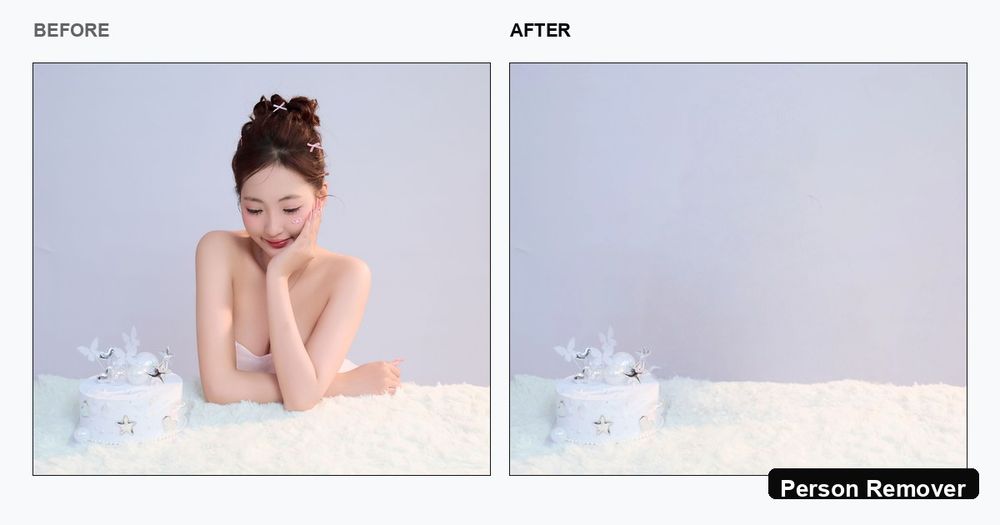
PersonRemover is a free, browser-based AI tool that removes unwanted people from photos in seconds. Upload a JPG, PNG, or WebP, and the AI either auto-detects people for one-click selection or lets you brush over anyone you want gone. The background behind the removed person is reconstructed automatically using a modern diffusion-based inpainting model.
Key Features
- Auto person detection — people are highlighted automatically; click to select who should be removed.
- Brush mode — paint over edges, hair, and limbs with adjustable brush size, plus Undo and Clear controls.
- AI background reconstruction — sky, streets, walls, and architecture fill back in cleanly without blur.
- No signup, no watermark — start editing immediately and download a clean PNG.
- Free daily edits — 2 free edits per day, plus 2 more when you sign in.
- HD download — results are saved as watermark-free PNG files.
- Format support — JPG, JPEG, PNG, and WebP up to about 10 MB.
Use Cases
- Travel photos — clear tourists and crowds from landmark shots so it looks like you had the place to yourself.
- Photobomber removal — erase the stranger who jumped into your group selfie in one brush stroke.
- Crowd & tourist removal — clean dense crowds out of street and event photos in a single pass.
- Group photo editing — drop an extra person from a group shot without cropping the whole frame.
- Person cutout — isolate one person from a busy background for use in a new scene or as a standalone portrait.
- Sticker removal — erase stickers, emoji reactions, chat bubbles, and overlay graphics from screenshots.
How It Works
- Upload — drop a JPG, PNG, or WebP (up to ~10 MB). Large images are resized automatically for fast processing.
- Select — people are detected automatically; click to select, or switch to brush mode for manual control.
- Download — hit remove, wait a few seconds, and download a clean, watermark-free PNG.
Limitations
- Images over ~1 megapixel are automatically resized; the saved result is 1MP regardless of input dimensions.
- Complex backgrounds (textured walls, foliage, patterned surfaces) may leave visible artifacts or repeated patterns.
- NSFW images are blocked at the upload stage.
- For full-resolution output on very large photos, a desktop editor is still recommended.
Target Users
Casual photographers, travelers, social media users, and anyone who wants to quickly clean up photos without Photoshop skills or a subscription.