What is Video Text Remover?
Overview
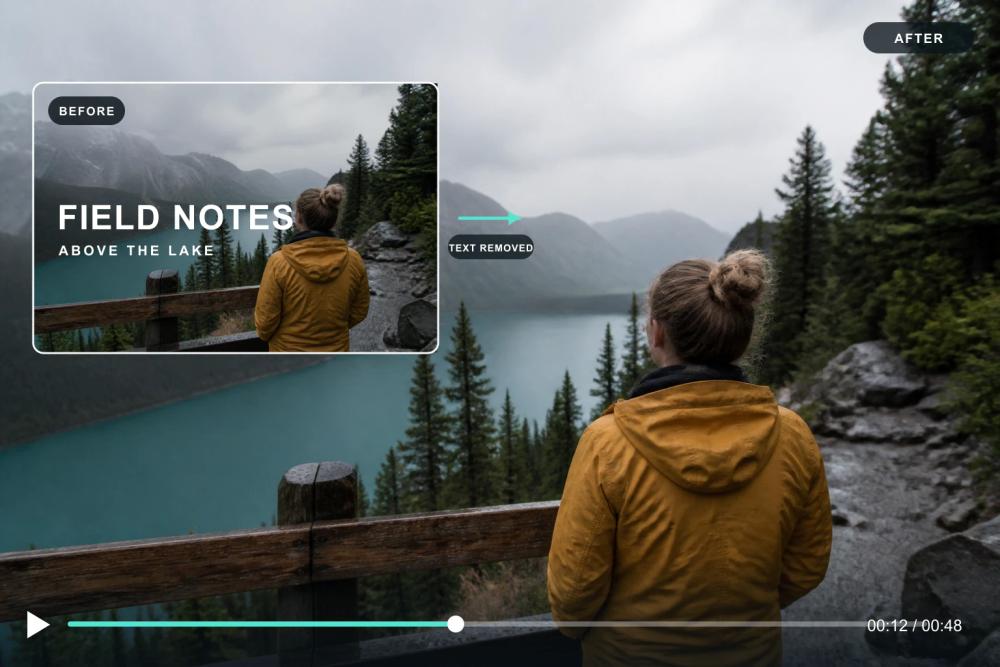
Video Text Remover is an AI-powered web tool that erases text, captions, subtitles, and watermarks from videos. Unlike basic editors that blur or crop, it uses context-aware background reconstruction to rebuild the area behind the text frame by frame, delivering clean, natural results.
Key Features
- Auto Text Detection: AI scans every frame to identify burned-in subtitles, TikTok captions, timestamp overlays, and watermarks.
- Manual Area Selection: Box specific regions for precise removal of logos or custom overlays.
- Standard & Advanced AI Modes: Choose processing quality based on your needs.
- No Blur, Clean Background: Context-aware reconstruction matches colors, textures, and motion from surrounding frames.
- Format Support: Works with MP4, MOV, and WebM files up to 500MB, processed directly in your browser.
- No Watermark on Export: Download clean clips in original resolution and frame rate.
- Free Credits: New users get 30 free credits after signing in (up to 30 sec Standard or 15 sec Advanced), no credit card required.
Use Cases
- Content Creators: Clean TikTok clips for cross-platform reposting on Instagram Reels or YouTube Shorts.
- Video Editors: Strip hard-coded subtitles from stock footage or webinar recordings.
- Social Media Managers: Remove watermarks, logos, and text overlays from repurposed content.
- General Users: Fix accidental text overlays or unwanted captions in personal videos.
How It Works
- Upload: Drag and drop your video (MP4, MOV, or WebM).
- AI Processing: The AI detects text regions and reconstructs the background behind them.
- Download: Get your clean video without any added watermark or compression.
Pricing
Standard processing costs 1 credit per second; Advanced text costs 2 credits per second. New users receive 30 free credits after signing in, covering up to 30 seconds of Standard or 15 seconds of Advanced processing. Additional credits can be purchased as needed.